R packages can get overwhelming. This post discusses foundational concepts of packages, how to install and load, and describes some best practices for handling multiple packages in your R code.
Packages are collections of R functions, data, and compiled code in a well-defined format. The directory where packages are stored is called the library.
What is “Base R?”
Base R can refer to a collection of packages that are installed by default with R and live in the “system library.” They are “built-in.” These basic packages allow R to work. We can use the sessionInfo() function to find which packages are being used by our current R session.
sessionInfo()
R version 4.4.1 (2024-06-14 ucrt)
Platform: x86_64-w64-mingw32/x64
Running under: Windows 11 x64 (build 22631)

Matrix products: default


locale:
[1] LC_COLLATE=English_United States.utf8
[2] LC_CTYPE=English_United States.utf8
[3] LC_MONETARY=English_United States.utf8
[4] LC_NUMERIC=C
[5] LC_TIME=English_United States.utf8

time zone: America/New_York
tzcode source: internal

attached base packages:
[1] stats     graphics  grDevices datasets  utils     methods   base

loaded via a namespace (and not attached):
 [1] htmlwidgets_1.6.4 compiler_4.4.1    fastmap_1.2.0     cli_3.6.3
 [5] htmltools_0.5.8.1 tools_4.4.1       yaml_2.3.10       rmarkdown_2.29
 [9] knitr_1.49        jsonlite_1.8.9    xfun_0.50         digest_0.6.37
[13] rlang_1.1.4       renv_1.1.4        evaluate_1.0.3
When a package is “attached,” functions that belong to that package are available for use by the user. We can also see package versions next to their name.
Tip: Visual Cues
I will use visual cues (and recommend you do as well) to distinguish between normal text, packages and function names, etc. When you see a function name, it will be followed by “()”. E.g. sessionInfo(). When you see a package name, it will be surrounded by curly brackets “{}”. E.g. The {tidyr} package.
Why do we want/need more functionality beyond “Base R?”
Package development is community driven, and many packages have overlapping functionality. If you can think of a need, there’s probably a package for it. There are clear “winners” in terms of number of downloads and active users for a package. Entirely new “dialects” of R programming have been borne out of community package development. The “tidyverse”, one such dialect, is a collection of packages with consistent principles that unify the packages. You can read more here: “tidy tools manifesto.”
Choice of package or function depend on what functionality is needed, what you value, and your aversion to risk. By risk, I mean the potential for functions to change or break when either your R version changes or the package version changes.
You will see me mostly using tidyverse packages because I value their human readability, consistent structure, and stability of included functions. Perhaps you’re still concerned with sustainability and “dependency-bloat,” so you stick with base R. Maybe you need functions that perform better, so you use the {data.table} package, another R “dialect.” Maybe you just prefer to use whichever functions require the least amount of code. There are other reasons you will come across that lead you to choose when and where to use a specific function.
How can I tell if a package is popular or stable?
Do some research! When was the last update? Check out the version history. Find the source code on GitHub; look at how many stars/follows it has. Look at the dates of forum and blog posts that use the function/package in question. Your knowledge of which packages are most popular will grow with experience.
How to install an R package
Use the install.packages() function to install new packages. This will attempt to download and install a package from a “package repository.” By default, R will use the “CRAN” repository (Comprehensive R Archive Network). There are other repos, like the public Posit Package Manager which have a wider range of package versions built for different versions of R. To manage packages, it’s easiest to use the RStudio GUI, but see ?update.packages() for programmatic options.
The following package(s) will be installed:
- tidyr [1.3.1]
These packages will be installed into "~/Daniel/R/R-useRs-group/Blog/renv/library/windows/R-4.4/x86_64-w64-mingw32".

# Installing packages --------------------------------------------------------
- Installing tidyr ...                          OK [linked from cache]
Successfully installed 1 package in 47 milliseconds.
The following package(s) will be installed:
- dplyr [1.1.4]
These packages will be installed into "~/Daniel/R/R-useRs-group/Blog/renv/library/windows/R-4.4/x86_64-w64-mingw32".

# Installing packages --------------------------------------------------------
- Installing dplyr ...                          OK [linked from cache]
Successfully installed 1 package in 20 milliseconds.
The following package(s) will be installed:
- conflicted [1.2.0]
These packages will be installed into "~/Daniel/R/R-useRs-group/Blog/renv/library/windows/R-4.4/x86_64-w64-mingw32".

# Installing packages --------------------------------------------------------
- Installing conflicted ...                     OK [linked from cache]
Successfully installed 1 package in 25 milliseconds.
# not run:# install.packages("tidyr", repos = "http://cran.us.r-project.org")# ?update.packages()
You only need to install one time
Typically, you would not have install.packages() appear in your code. I use it here for demonstration purposes. Usually, when I want to install a package, I type the function into the console. Any R session you open will have access to your package library. The exception is if you are using an environment manager like {renv}.
Package Dependencies
Some packages have dependencies “under the hood.” In other words, some packages rely on the functions/source code of other packages to work. R is smart enough to install dependencies by default, which means there will be package names you may not recognize in your library.
Caution
When you update a package, R may not successfully install the correct version of a dependency if you already had a previous version installed. This leads to several troubleshooting steps of updating packages. I recommend to avoid updating unless you have a good reason to do so. At a later time, we will discuss {renv}, an R environment manager.
Loading/Attaching a package
Packages are attached using the library() or require() functions. You will most often see library(). R will look to default library paths, so you will usually not see the library specified when using library(). You can view your library file paths available to your R session using the .libPaths() function.
Warning: package 'tidyr' was built under R version 4.4.3
sessionInfo()
R version 4.4.1 (2024-06-14 ucrt)
Platform: x86_64-w64-mingw32/x64
Running under: Windows 11 x64 (build 22631)

Matrix products: default


locale:
[1] LC_COLLATE=English_United States.utf8
[2] LC_CTYPE=English_United States.utf8
[3] LC_MONETARY=English_United States.utf8
[4] LC_NUMERIC=C
[5] LC_TIME=English_United States.utf8

time zone: America/New_York
tzcode source: internal

attached base packages:
[1] stats     graphics  grDevices datasets  utils     methods   base

other attached packages:
[1] tidyr_1.3.1

loaded via a namespace (and not attached):
 [1] digest_0.6.37     R6_2.5.1          fastmap_1.2.0     tidyselect_1.2.1
 [5] xfun_0.50         magrittr_2.0.3    glue_1.8.0        tibble_3.2.1
 [9] knitr_1.49        pkgconfig_2.0.3   htmltools_0.5.8.1 generics_0.1.3
[13] rmarkdown_2.29    dplyr_1.1.4       lifecycle_1.0.4   cli_3.6.3
[17] vctrs_0.6.5       renv_1.1.4        compiler_4.4.1    purrr_1.0.2
[21] tools_4.4.1       pillar_1.10.1     evaluate_1.0.3    yaml_2.3.10
[25] rlang_1.1.4       jsonlite_1.8.9    htmlwidgets_1.6.4
Important: Attach packages with intentionality.
When you load a package using library(), you attach all functions and data associated with that package.
Only install and load a package if you know what functions you want to use. I recommend keeping a note specifying why you’re attaching an entire package and which functions are most used.
Generally, we want our programming projects to be sustainable and reproducible. Attaching too many packages leads to ambiguity in your code and may lead to unexpected behavior, so don’t do it!
To disambiguate your code, you can use functions from a particular package without attaching the full package. To do this, use the double colon operator ::
# not run:# tidyr::pivot_longer()
In this example, I’m accessing the function called pivot_longer() from the {tidyr} package. Notably, this did not require attaching the {tidyr} package using library(), BUT the package would still need to be installed first using install.packages(). While this is less clean (and longer!) than simply attaching the full package, I believe beginner R programmers greatly benefit from disambiguating their code using ::.
Where does it go in my script?
Generally, I like to load all packages at the beginning of my R script. I will have a code chunk or section dedicated to “setup,” which might include several calls to library() and maybe loading in some data.
Unexpected behavior
Did you attach too many packages? Is a function not working like you expected? Did R give you a warning that a function is deprecated or has been superseded?
Masking
There exists NO rule that developers of packages must use different names or follow certain conventions or principles. This means that two separate packages may both attach a function when loaded that has the same name. Let’s see what happens when the entire tidyverse is attached:
library(tidyverse)
Warning: package 'dplyr' was built under R version 4.4.3
Warning: package 'stringr' was built under R version 4.4.3
Warning: package 'lubridate' was built under R version 4.4.3
── Attaching core tidyverse packages ──────────────────────── tidyverse 2.0.0 ──
✔ dplyr     1.1.4     ✔ purrr     1.0.2
✔ forcats   1.0.0     ✔ readr     2.1.5
✔ ggplot2   4.0.0     ✔ stringr   1.5.1
✔ lubridate 1.9.4     ✔ tibble    3.2.1
── Conflicts ────────────────────────────────────────── tidyverse_conflicts() ──
✖ dplyr::filter() masks stats::filter()
✖ dplyr::lag()    masks stats::lag()
ℹ Use the conflicted package (<http://conflicted.r-lib.org/>) to force all conflicts to become errors
Note that most packages aren’t so kind as to print out messages such as these.
We can see that the dplyr::filter() function masked the stats::filter() function. Same for lag().
Important
The order in which you attach a package determines which version of a function will be used when you call that function in your code. With each new package attached, all previously attached functions with the same name will be “masked.” This is what disambiguating your code using :: helps with.
The {conflicted} package helps you identify masking and forces the user to decide which function to prioritize.
detach("package:tidyverse", unload =TRUE)library(conflicted)library(dplyr)# not run:# filter(starwars, species == "Human")
If the above filter() was run, it would result in an Error, and prevent me from rendering this document. The error would read:
Error:
! [conflicted] filter found in 2 packages.
Either pick the one you want with `::`:
• dplyr::filter
• stats::filter
Or declare a preference with `conflicts_prefer()`:
• conflicts_prefer(dplyr::filter)
• conflicts_prefer(stats::filter)
Backtrace:
 1. conflicted (local) `<fn>`()
Notice how disambiguating with dplyr::filter() runs fine:
dplyr::filter(starwars, species =="Human")
# A tibble: 35 × 14
   name     height  mass hair_color skin_color eye_color birth_year sex   gender
   <chr>     <int> <dbl> <chr>      <chr>      <chr>          <dbl> <chr> <chr>
 1 Luke Sk…    172    77 blond      fair       blue            19   male  mascu…
 2 Darth V…    202   136 none       white      yellow          41.9 male  mascu…
 3 Leia Or…    150    49 brown      light      brown           19   fema… femin…
 4 Owen La…    178   120 brown, gr… light      blue            52   male  mascu…
 5 Beru Wh…    165    75 brown      light      blue            47   fema… femin…
 6 Biggs D…    183    84 black      light      brown           24   male  mascu…
 7 Obi-Wan…    182    77 auburn, w… fair       blue-gray       57   male  mascu…
 8 Anakin …    188    84 blond      fair       blue            41.9 male  mascu…
 9 Wilhuff…    180    NA auburn, g… fair       blue            64   male  mascu…
10 Han Solo    180    80 brown      fair       brown           29   male  mascu…
# ℹ 25 more rows
# ℹ 5 more variables: homeworld <chr>, species <chr>, films <list>,
#   vehicles <list>, starships <list>
To fix the problem, let’s use the conflicts_prefer() function from the {conflicted} package to specify which version of filter() we actually want to use.
conflicted::conflicts_prefer(dplyr::filter)
[conflicted] Will prefer dplyr::filter over any other package.
Now, we can use our preferred filter() without the call to dplyr::
filter(starwars, species =="Human")
# A tibble: 35 × 14
   name     height  mass hair_color skin_color eye_color birth_year sex   gender
   <chr>     <int> <dbl> <chr>      <chr>      <chr>          <dbl> <chr> <chr>
 1 Luke Sk…    172    77 blond      fair       blue            19   male  mascu…
 2 Darth V…    202   136 none       white      yellow          41.9 male  mascu…
 3 Leia Or…    150    49 brown      light      brown           19   fema… femin…
 4 Owen La…    178   120 brown, gr… light      blue            52   male  mascu…
 5 Beru Wh…    165    75 brown      light      blue            47   fema… femin…
 6 Biggs D…    183    84 black      light      brown           24   male  mascu…
 7 Obi-Wan…    182    77 auburn, w… fair       blue-gray       57   male  mascu…
 8 Anakin …    188    84 blond      fair       blue            41.9 male  mascu…
 9 Wilhuff…    180    NA auburn, g… fair       blue            64   male  mascu…
10 Han Solo    180    80 brown      fair       brown           29   male  mascu…
# ℹ 25 more rows
# ℹ 5 more variables: homeworld <chr>, species <chr>, films <list>,
#   vehicles <list>, starships <list>
Built in data sets
Notice how I simply use the object called starwars? That’s an example of a built in data imported by {dplyr} for demonstration purposes. It contains information on Star Wars characters. It’s attached when {dplyr} is loaded.
Lifecycle
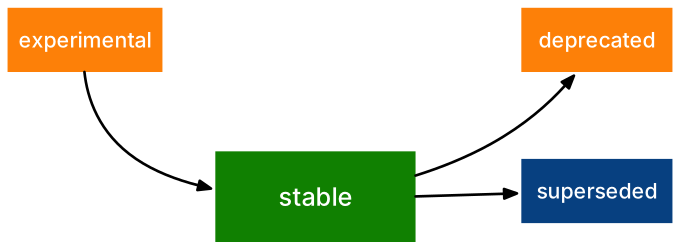
Packages change over time. Some very prominent packages, like tidyr, supersede old packages while retaining some of the older functions. E.g. gather() versus pivot_longer(). View the help pages!
# not run:# ?tidyr::gather()# ?tidyr::pivot_longer()# create new data "starwars_select" from "starwars" and select specified columns.starwars_select <- starwars |> dplyr::select(name, hair_color, skin_color, eye_color)# from "starwars_select", use gather() to make data longer format, then sort by namestarwars_select |> tidyr::gather(key ="attribute", value ="value", hair_color, skin_color, eye_color, na.rm =TRUE) |> dplyr::arrange(name)
# A tibble: 256 × 3
   name             attribute  value
   <chr>            <chr>      <chr>
 1 Ackbar           hair_color none
 2 Ackbar           skin_color brown mottle
 3 Ackbar           eye_color  orange
 4 Adi Gallia       hair_color none
 5 Adi Gallia       skin_color dark
 6 Adi Gallia       eye_color  blue
 7 Anakin Skywalker hair_color blond
 8 Anakin Skywalker skin_color fair
 9 Anakin Skywalker eye_color  blue
10 Arvel Crynyd     hair_color brown
# ℹ 246 more rows
# Use pivot_longer() to make data longer formatstarwars_select |> tidyr::pivot_longer(cols =c(hair_color, skin_color, eye_color), names_to ="attribute", values_to ="values", values_drop_na =TRUE) |> dplyr::arrange(name)
# A tibble: 256 × 3
   name             attribute  values
   <chr>            <chr>      <chr>
 1 Ackbar           hair_color none
 2 Ackbar           skin_color brown mottle
 3 Ackbar           eye_color  orange
 4 Adi Gallia       hair_color none
 5 Adi Gallia       skin_color dark
 6 Adi Gallia       eye_color  blue
 7 Anakin Skywalker hair_color blond
 8 Anakin Skywalker skin_color fair
 9 Anakin Skywalker eye_color  blue
10 Arvel Crynyd     hair_color brown
# ℹ 246 more rows
We can use the pkg_lifecycle_statuses() function from the {lifecycle} package to view function statuses in a specified package. Any function not “stable” will be listed. “Stability” harkens to the “lifecycle” of a package or function.
Packages that help with installing/ attaching packages (yes, they exist)
Some books, like the Epidemiologist R Handbook, recommend that you use the {pacman} package to install and load packages. This package has some extra utility that may be helpful. Other packages include {pak}, which have functions for installing packages from GitHub or other sources. There are other ways to install packages but beyond the scope of this document. See: The Comprehensive Guide to Installing R Packages from CRAN, Bioconductor, GitHub and Co.
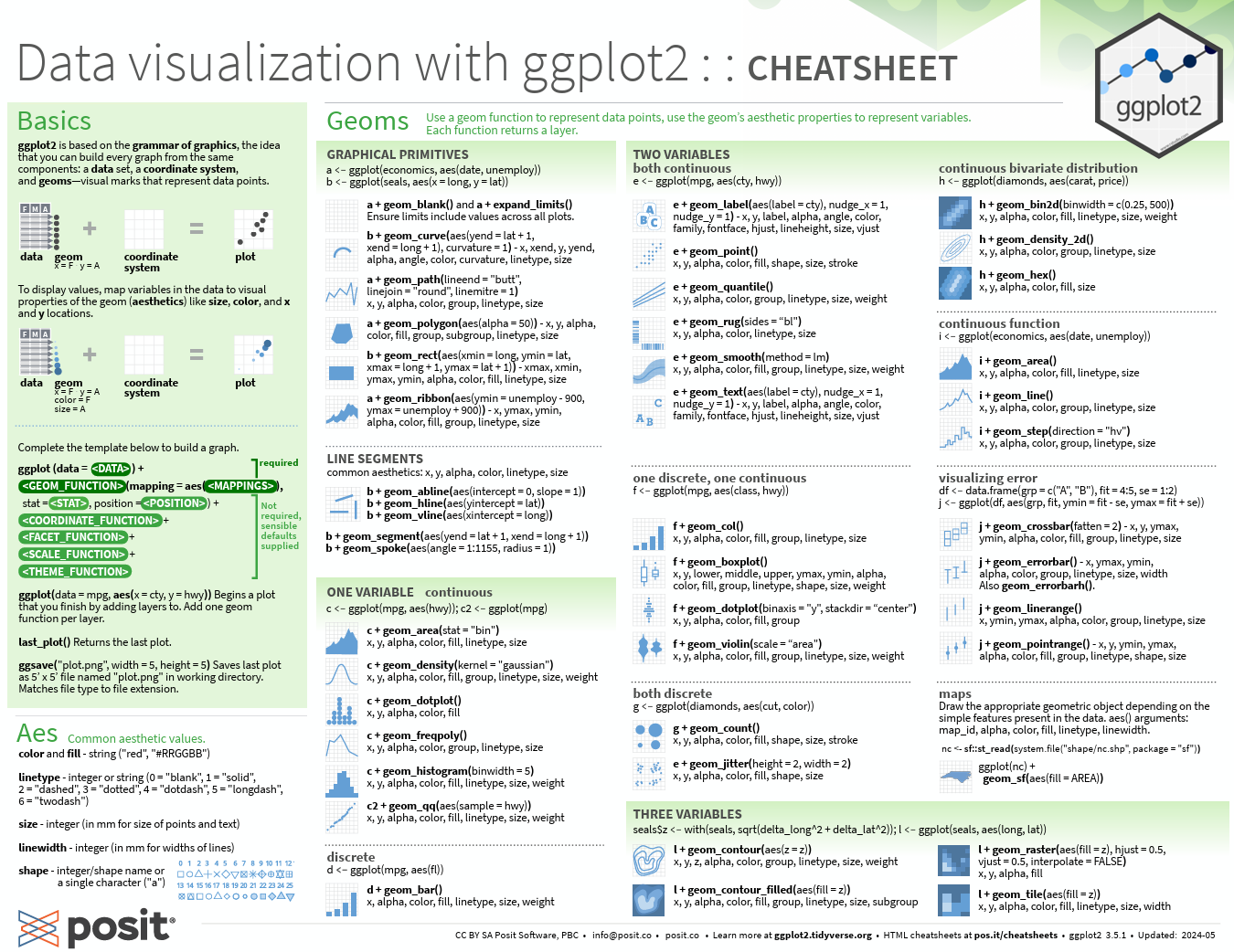
Cheatsheets
Cheatsheets are a good way of becoming familiar with package functions! Many of the most popular packages have cheatsheets as well. Access them here: Posit Cheatsheets